
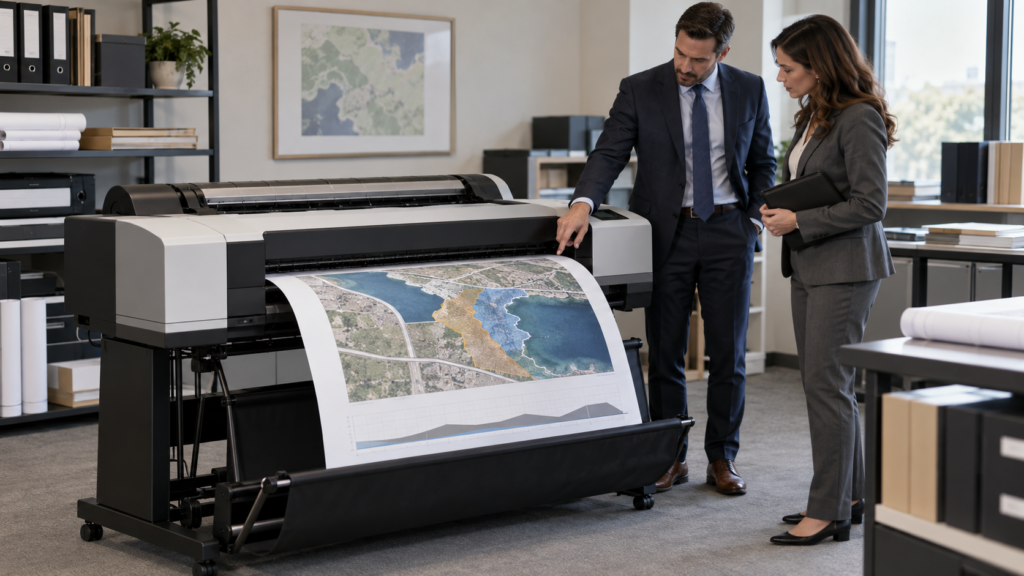
A large format printer for law firms can make sense when attorneys and trial-support staff regularly need oversized exhibits, timelines, maps, plans, or presentation boards on short notice. It is usually a poor investment when those jobs are rare. The right decision depends on annual volume, deadline pressure, confidentiality requirements, required sizes, floor space, staff ownership, service support, and the full cost of ink and media—not just the equipment price.
The practical question is not whether in-house printing is possible. It is whether bringing the work inside will be more reliable, secure, and economical than using a qualified outside provider.
When does a large format printer for law firms make sense?
In-house equipment is most valuable when oversized work is frequent, time-sensitive, or difficult to send outside. A litigation team may discover during final preparation that a chronology needs one more event, a medical illustration needs a clearer label, or a site plan needs a different crop. If the only option is an outside print shop, every revision adds coordination and travel time.
Ownership is less compelling when the firm produces only a few boards each year. Outsourcing can provide access to different substrates, finishing options, mounting, and experienced production help without leaving an underused device in the office. A hybrid approach is often sensible: print routine drafts and common exhibit sizes in-house, then outsource specialty materials and unusual finishing.
What would the firm actually print?
Start with real jobs from the past 12 months. List the finished dimensions, color requirements, media, turnaround time, number of revisions, and outside cost for each one. Typical legal-office uses can include trial exhibit boards, timelines, maps, site plans, engineering drawings, medical illustrations, enlarged documents, and internal case-planning material.
Do not assume every oversized item needs the same machine. A 24-inch device may handle one firm’s regular work, while another needs 36-inch output or occasional access to even larger specialty production. If the firm also receives rolled plans or oversized originals, scanning and copying requirements may matter as much as printing.
Seven checks before bringing exhibit printing in-house
1. Measure demand and deadline pressure
Count jobs, pages, revisions, rush charges, courier trips, and staff hours. Separate predictable work from emergencies. A device that prevents repeated last-minute delays may have operational value beyond the invoice total, but that value should be based on the firm’s history rather than a general promise.
2. Define size, color, and media requirements
Write down the largest finished size the firm commonly needs and the media it expects to use. Confirm whether the proposed configuration supports those sizes and materials. Ask for samples using representative case graphics. Fine text, thin lines, shaded medical images, maps, and photographs can expose different strengths and weaknesses.
3. Decide whether scanning is part of the job
Some large-format models print only; others add an integrated scanner or a separate scanner system. Scanning can help when the office receives plans, maps, or marked-up originals that must be copied or digitized. It does not replace a high-volume office document scanner for stacks of letter-size case records. Treat those as separate workflows unless testing proves otherwise.
4. Map confidentiality and vendor handling
Keeping a job in-house can reduce the number of outside handoffs, but it does not automatically make the workflow secure. The ABA Model Rule 1.6 says lawyers should make reasonable efforts to prevent unauthorized access to information relating to a representation. Applicable Florida rules, court orders, client requirements, and the facts of the matter may add obligations. This article is operational guidance, not legal or ethics advice.
If work remains outsourced, evaluate the provider’s access, retention, disposal, transport, and incident-notification practices. If work moves in-house, define who may release, reprint, scan, or dispose of exhibits and where temporary files will be stored.
5. Confirm placement and ownership
A large format printer needs more than its listed cabinet dimensions. Allow room for loading rolls, receiving finished output, opening service panels, storing media, and working around the device. Confirm power, network, floor, temperature, and humidity requirements. Assign an employee to own supplies, approved media, routine checks, and vendor calls.
6. Compare total cost, not the purchase price
Build a simple comparison that includes equipment, scanner options, stands or baskets, ink, printheads or maintenance items, media, service, installation, training, network work, staff time, and expected replacement period. Compare that total with outside printing, rush charges, delivery, travel, and internal coordination. Ask how unused ink, long idle periods, or a sudden high-volume case could change the calculation.
7. Plan security, service, and continuity
Any networked printer should be included in device inventory, access control, update planning, and secure disposal. Confirm the exact model’s security features and which ones require configuration. Decide what the firm will do when the device is down during trial preparation. A local service plan and a prequalified outside backup provider can both be part of the answer.
How do Canon imagePROGRAF TM and TX options differ?
Canon’s September 15, 2026 announcement introduced seven TM-series devices and five TX-series devices. The official Canon announcement says the TM-510M prints up to 24 inches wide and the TM-610M up to 36 inches wide. Both combine a printer and built-in large-format scanner in a compact footprint, use a customizable 5-inch touchscreen, and are rated to scan up to 5 inches per second in color and 10 inches per second in monochrome under Canon’s stated conditions.
The TX MFP Z36 configurations pair a printer with a 36-inch scanner and are aimed at higher-productivity drawing output, digitization, and copying. Canon’s current product information lists the Z36 scanner at up to 13 inches per second in black and white and 6 inches per second in color. Rated speeds are comparison points, not promises for every file, setting, media type, or workflow.
For a law firm, the model decision should begin with output width, actual monthly demand, scanning needs, space, and service—not with the highest speed on a specification sheet. Ask for a live demonstration using representative timelines, maps, fine text, color exhibits, and any oversized originals the office commonly receives.
What should a live demonstration include?
Bring several real but non-confidential test files. Include a text-heavy timeline, a color image, a map or drawing with fine lines, and a file that has caused trouble at an outside shop. Time the complete workflow from opening the file through usable output. Check scaling, margins, small type, color, drying and handling, trimming needs, and reprint steps.
If scanning is important, bring a representative non-confidential oversized original. Confirm how the operator loads it, previews it, corrects orientation, names the file, and sends it to an approved destination. Do not rely on a polished vendor sample that avoids the firm’s difficult material.
What this means for Tallahassee law firms
Tallahassee firms may face a mix of court, agency, construction, real-estate, and commercial matters that create oversized-document needs. Advanced Business Systems has served the Tallahassee market since 1984 and supports organizations across North Florida and South Georgia from its Tallahassee operation.
ABS can help measure the current workflow, compare an in-house device with continued outsourcing, review network and placement requirements, and test a proposed configuration. The goal should be a defensible business decision—even when the answer is to keep using an outside provider. Call (850) 222-2308 or request a configuration-specific quote for the workflow, device, and service plan you are considering.
Frequently asked questions
Can a law firm print trial exhibits in-house?
Yes. A properly sized large-format device can produce timelines, maps, enlarged documents, and exhibit boards. The firm should test the required sizes, media, color, finishing, and turnaround before choosing a configuration.
Does a large format printer for law firms also scan?
Some configurations do. Canon’s TM-510M and TM-610M include built-in large-format scanners, while selected TX MFP Z36 configurations use a 36-inch scanner system. Verify the exact current model and options.
Is in-house printing automatically more confidential?
No. It can reduce outside handoffs, but the firm still needs appropriate access, file handling, network security, disposal, and oversight. Outside providers also require due diligence and clear handling expectations.
When is outsourcing the better choice?
Outsourcing is often better when oversized jobs are rare, specialty finishing is important, staff cannot own the workflow, or the office lacks suitable space. A hybrid plan can keep routine work inside while reserving unusual jobs for a qualified provider.