
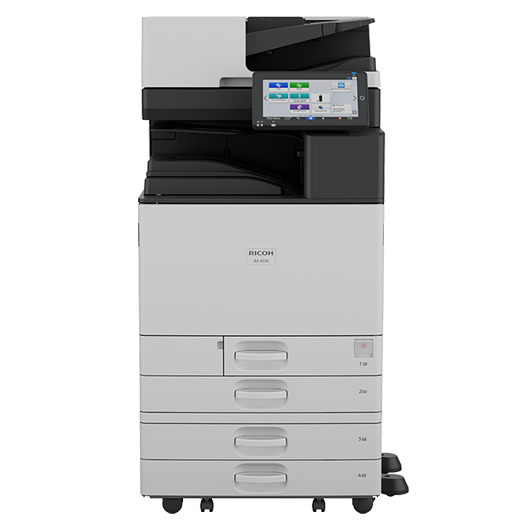
The Ricoh IM 4510 is a current A3 black-and-white multifunction printer worth comparing when an IM 4000 owner plans an additional device or replacement. Do not treat a newer model as a reason to replace a working machine automatically. Check workload, configuration, support and a written quote before deciding.
What Happened to the Ricoh IM 4000?
Ricoh announced the IM 4510 on April 29, 2026 as part of its refreshed A3 black-and-white family, from IM 2510 through IM 7010. See Ricoh’s U.S. launch announcement. That announcement does not establish today’s IM 4000 inventory, a dealer’s stock or the support terms for an installed device.
Ask your provider to confirm current availability, repair support, parts arrangements and contract coverage for your specific IM 4000. New-product sales status and installed-device service are separate questions. Do not assume that either stock depletion or continuing support has been established without current written evidence.
What Is the Ricoh IM 4510 Built For?
The Ricoh IM 4510 is a 45 page-per-minute black-and-white multifunction printer aimed at busy offices and workgroups. According to Ricoh’s product page, it supports output up to 12 by 18 inches. Ricoh advertises scanning up to 300 images per minute for the platform; verify the feeder, duplex conditions and settings needed for that maximum. Do not use a maximum monthly figure as a target operating volume.
It prints, copies, scans, and faxes (fax is optional), with a 10.1-inch touchscreen. Paper capacity tops out at 4,850 sheets with expansion, and finishing options include hybrid and booklet finishers. Confirm the exact included and optional equipment in the configuration-specific quote.
Is the Ricoh IM 4510 More Secure Than the Older Model?
Ricoh describes security and management capabilities for the platform, but their availability and behavior depend on configuration and connected services. Ask which storage protections, authentication methods, print-release options and update controls are included and enabled in the proposed system. A feature list alone is not a security comparison with your current machine.
Features alone don’t make an office secure, though. Settings, user permissions, and updates still have to be configured and maintained. Healthcare and other regulated offices need qualified review of the complete data path, access, agreements and responsibilities. No device purchase establishes HIPAA compliance.
How Much Does the Ricoh IM 4510 Cost?
Price depends on the configuration, not just the model number. The big cost drivers are finishers and extra paper trays, optional fax, the service and supply agreement, and whether you buy or lease. Any public-sector purchasing route requires separate verification of current eligibility, covered configuration and ordering terms. We won’t quote a number here because any figure without your volume and options would be a guess.
Ask for a quote that shows hardware, service, and supplies side by side. Compare the warranty and the service agreement separately, including exclusions, supplies, response arrangements, renewal and end-of-term obligations. Neither one should be assumed to include the other.
What Are the Tradeoffs and Alternatives?
The tradeoff is simple: a new model means new pricing and new software to learn, and the Ricoh IM 4510 may be more machine than a small office needs. The IM 2510 or IM 3510 in the same family may fit lighter workloads. Other brands we sell, Canon, Kyocera, and Toshiba, have competing A3 models worth comparing.
And doing nothing? If your IM 4000 runs fine and your volume hasn’t changed, keeping it under a solid service agreement is a perfectly good answer. Upgrade when repair costs, speed, or security gaps start costing you real money.
Who Should Consider the Ricoh IM 4510?
Offices that need an IM 4000 for growth, a second floor, or a replacement for an aging copier are the natural fit. Workgroups that print, scan, and share documents all day benefit most. A low-volume office may be better served by a smaller device, but paper size, scanning, finishing and accessibility requirements can matter as much as headcount.
It also helps to check energy use. Compare the proposed configuration’s current energy specification and applicable certification record. Energy consumption in your office also depends on settings, workload and operating hours; a product label is not a guaranteed savings figure.
What Should You Test Before Accepting a Replacement?
Build a short acceptance checklist from your own work, not just a brochure. Use synthetic or appropriately approved sample documents. Have the provider demonstrate the quoted configuration and record any option, license or service that the test depends on.
- Typical output. Print representative jobs at the required sizes and settings. Check duplex pages, legibility, paper handling and the finishing your staff actually uses. Rated engine speed does not include every task in a completed job.
- Document capture. Scan a mixed but supported sample batch. Inspect both sides, page order, orientation and searchable-text accuracy. Confirm which feeder and software are included; a peak duplex scan rate does not guarantee that an operator can review and file documents at that pace.
- Destinations and sign-in. Test the required email, folder or document-system route with authorized test accounts. Check what happens when a destination is unavailable and who receives the error. Do not assume that old address books and permissions transfer unchanged.
- Operating responsibilities. Identify who manages firmware, users, supplies, meter reporting and configuration backups. Ask how remote support is authorized and what happens when monitoring is unavailable. Record any customer tasks excluded from the service agreement.
- Transition and exit. Plan installation, training, old-device data handling and the return or retention of existing equipment. Confirm lease-end and service-contract obligations before scheduling a swap; buying a new device does not cancel an old agreement.
If the current IM 4000 still meets the requirement, compare the cost and risk of keeping it with the full replacement proposal. If a new device is justified, use the acceptance record to confirm that the ordered configuration—not an unquoted demonstration system—supports the required work.
Keep the final quote and acceptance checklist together so future staff can distinguish ordered options from features shown only in a demonstration.
What This Means for Tallahassee Businesses
If you run an office in Tallahassee, Thomasville, or anywhere across North Florida and South Georgia, the question is simple: do you need to move now? Advanced Business Systems has been serving this area since 1984, and we sell and service Canon, Kyocera, Ricoh, and Toshiba. Ask us to review your actual page counts, paper sizes, scan tasks and current agreements before recommending a configuration. Call (850) 222-2308 or request a configuration-specific quote.
Frequently Asked Questions
Q: Can I still buy a Ricoh IM 4000?
A: Ask Ricoh or your dealer for current written availability. This article does not verify remaining manufacturer or dealer inventory. Compare available options rather than assuming that a particular model is in stock.
Q: Will my existing IM 4000 still be serviced?
A: Machines in the field continue to run, and service is a separate question from sales. Ask your service provider to confirm coverage terms for your specific machine.
Q: Is the Ricoh IM 4510 a good fit for a law firm?
A: It may be, depending on paper handling, supported authentication, scan destinations, permissions and ongoing support. Have the proposed workflow reviewed against the firm’s requirements before purchase.