
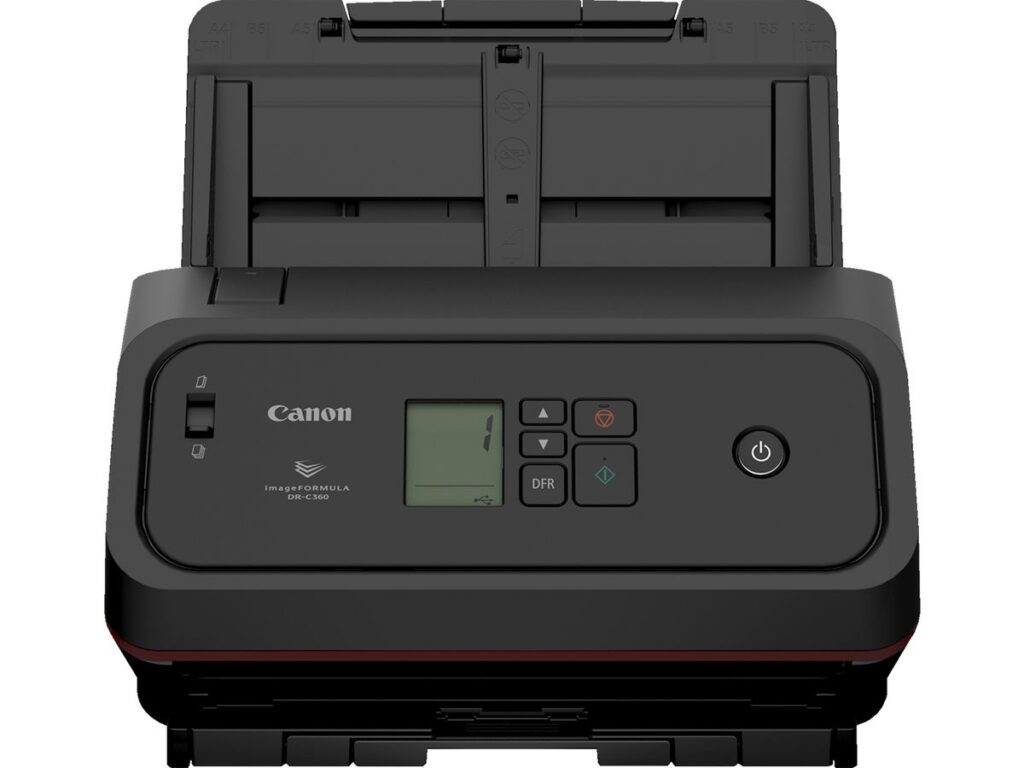
The Canon DR-C360 is Canon’s new 60-page-per-minute desktop document scanner, and it officially replaces the imageFORMULA DR-M160II, which Canon discontinued effective immediately on September 23, 2026. If you already own a DR-M160II, nothing breaks tomorrow. But if you were about to buy one, stop — the DR-C360 is what you’ll be quoting now, and it’s a real step up: a bigger feeder, longer-document support and passport scanning without a carrier sheet.
What is the Canon DR-C360?
The Canon DR-C360 is a compact desktop document scanner built for busy offices that scan all day. According to Canon U.S.A.’s September 23 announcement, it scans up to 60 pages per minute in color or black-and-white, with duplex built in (that’s up to 120 images per minute counting both sides).
Here’s what matters on paper:
- 100-sheet feeder — up from 60 sheets on the DR-M160II. Fewer trips back to the scanner to reload.
- Up to 13,000 sheets a day recommended daily volume.
- Long documents up to 240 inches — twice what the DR-M160II handled.
- Passport and ID card scanning, usually without a carrier sheet (Canon notes a worn passport may still need one).
- USB Type-C connection, an icon-based LCD and up to 49 one-touch scan jobs stored on the unit.
- Bundled software: CaptureOnTouch v5 Pro, ReadIRIS OCR and Tungsten VRS Elite.
Canon also says the roller replacement kit has fewer parts and the unit draws less power than the model it replaces. You can see the full spec sheet on Canon’s DR-C360 product page.
Why did Canon discontinue the DR-M160II?
Canon replaced it because the DR-C360 is the successor — same job, better hardware. The DR-M160II was a workhorse, but it’s been around a long time. Canon’s dealer bulletin says remaining DR-M160II stock is limited, so if a quote you received still lists it, expect a substitution.
Already own one? Keep using it. Discontinued doesn’t mean unsupported. Rollers, drivers and service don’t vanish the day a model leaves the price list. The real question is what you do when that scanner wears out — and now you know the answer.
How much does the Canon DR-C360 cost?
Canon hasn’t published a list price in its announcement — it directs buyers to authorized dealers. So we won’t make up a number. What we can tell you is what actually drives what you’ll pay:
- Buy vs. lease vs. bundle. A standalone scanner is usually bought outright. Some offices fold it into a copier lease or managed print agreement.
- Service coverage. A scanner that runs 5,000+ pages a day eats rollers. Consumables and a service plan belong in the real cost comparison, not just the sticker price.
- Software and setup. The bundled software handles a lot. Integration into a document management system, EHR or case-management platform is where labor shows up.
- Contract pricing. Government buyers may be able to purchase through a cooperative contract — but model lists on contracts can lag a discontinuation, so confirm the DR-C360 is listed before you cut a PO.
Canon DR-C360 vs. DR-M160II: is the upgrade worth it?
For a new purchase, yes — there’s no reason to chase remaining DR-M160II stock unless you need an identical unit to match an existing workflow. The Canon DR-C360 gives you 40 more sheets in the feeder, double the long-document length and passport scanning at the same 60 ppm speed class.
For a working DR-M160II? Honestly, don’t replace a healthy scanner just because a newer one exists. Replace it when repair costs, downtime or a new requirement (like ID scanning at intake) make it worth it. Doing nothing is a legitimate option here.
Also look sideways at the lineup. Canon’s DR-C300 series includes the DR-C340 (40 ppm) and DR-C350 (50 ppm) with the same 100-sheet feeder. If your office scans a few hundred pages a day, the extra speed of the DR-C360 may be money you don’t need to spend.
Who is the Canon DR-C360 a good fit for — and who isn’t?
Good fit: medical front desks scanning insurance cards and intake packets, law firms digitizing case files, title and mortgage offices, HR and records departments, and state agency offices running backlog conversion. Anywhere one person feeds stacks of mixed paper all day.
Probably not a fit:
- Offices that scan occasionally — your copier/MFP’s document feeder already does this job.
- Shared scanning across a department without a dedicated PC — a network-connected model (like the DR-S350NW) may make more sense, since the DR-C360 connects by USB.
- True production scanning of tens of thousands of pages a day — step up to a production-class imageFORMULA.
Not sure which bucket you’re in? Our guide to copiers vs. printers walks through the same “match the device to the workload” thinking.
What should current DR-M160II owners do now?
Three things:
- Check your spares. Make sure you have a roller kit on hand so a worn roller doesn’t turn into downtime.
- Note the scanner’s age and volume. If it’s high-mileage, budget for a Canon DR-C360 in the next cycle.
- Review open quotes and contract lists. Anything still quoting the DR-M160II should be re-quoted.
What This Means for Tallahassee Businesses
At Advanced Business Systems, we’ve been selling and servicing Canon equipment across Tallahassee, Thomasville, North Florida and South Georgia since 1984. If you’re running a DR-M160II today, we can tell you straight whether it’s got life left or whether the Canon DR-C360 is the smarter move. For Florida public agencies, see our breakdown of the Florida scanner contract, and for a look at the broader lineup, read Canon’s award-winning imageFORMULA scanners. Call us at (850) 222-2308.
Frequently Asked Questions
Is the Canon DR-C360 available now?
Yes. Canon announced it September 23, 2026 as available for purchase through authorized Canon dealers.
Will my DR-M160II still be supported?
Discontinuation ends new sales, not support. Existing units can keep running; talk to your dealer about parts and service coverage for your specific unit.
Does the DR-C360 connect to the network?
It connects by USB Type-C to a PC. If you need a network-attached scanner shared by several users, ask about Canon’s network models instead.