
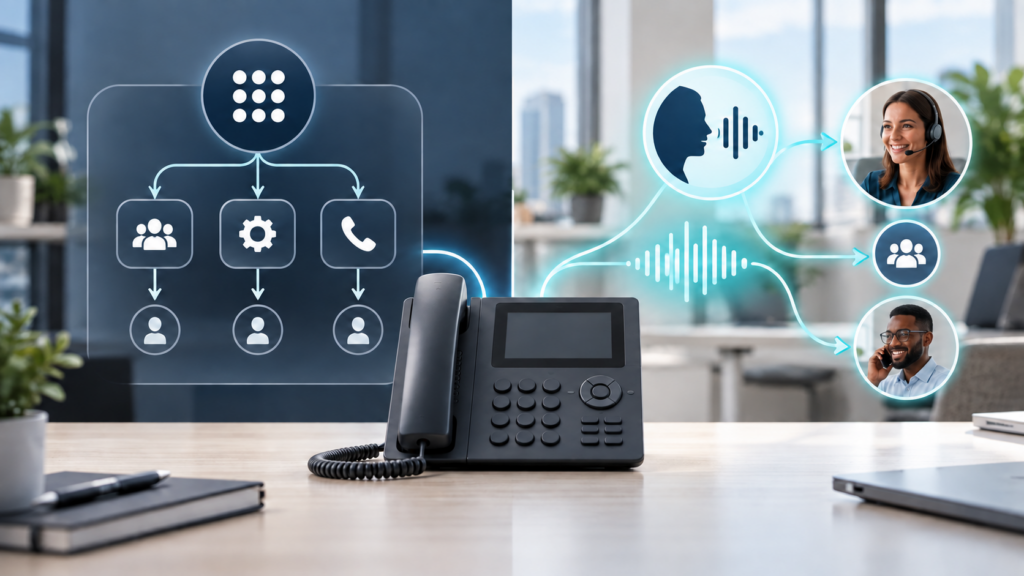
AI receptionist vs auto attendant is not a choice between new technology and an obsolete phone system. The two tools solve different problems. An auto attendant follows a defined menu and routes callers according to keypad or voice selections. An AI receptionist can ask and answer questions in more natural language, collect information, and decide when to transfer a caller.
For many small businesses, the best answer is a blended call flow: keep predictable routing for essential paths, use conversational automation for selected questions or after-hours coverage, and preserve a reliable path to a person. These seven buying questions help separate a useful business tool from an impressive demonstration.
AI receptionist vs auto attendant: what is the difference?
A traditional auto attendant is the familiar phone menu that says, for example, to choose sales, service, billing, or a company directory. Its strength is consistency. The caller selects from choices the business has already defined, and the system sends the call to the associated extension, hunt group, queue, voicemail box, or recording.
An AI receptionist accepts a more open-ended request. A caller might say, “I need service on our copier,” “Are you open Friday?” or “I want to reschedule an appointment.” The system attempts to recognize the caller’s intent, use approved business information, complete an allowed task, or transfer the call according to configured rules.
| Consideration | Auto attendant | AI receptionist |
|---|---|---|
| Caller interaction | Fixed choices and routes | Natural-language questions and responses |
| Best fit | Predictable departments and simple routing | Variable questions, after-hours coverage, and information collection |
| Setup focus | Menu design, schedules, and destinations | Knowledge, guardrails, testing, escalation, and destinations |
| Main risk | Long or confusing menus | Incorrect answers, misunderstood intent, or weak fallback |
| Human role | Receives routed calls | Receives calls the automation cannot or should not handle |
Neither tool fixes a bad call flow by itself. A short, well-designed auto attendant can serve callers better than a poorly governed conversational system. An AI receptionist can add value when the business gives it accurate information, narrow responsibilities, tested transfer rules, and human backup.
1. What calls should the system handle?
Start with recent call history rather than a feature list. Identify why people call, when they call, which calls are transferred, which questions repeat, and which calls require judgment. Separate routine requests from high-risk or sensitive conversations.
An auto attendant may be sufficient when most callers know the department or person they need. An AI receptionist may help when callers describe a problem in their own words, ask recurring questions, or call when the front desk is busy or closed. It should not be expected to make professional judgments, negotiate disputes, approve payments, or improvise policy.
Write a clear scope before configuration. For example: answer published questions about hours and locations, collect a callback number, route service calls, and transfer any billing dispute to an employee. A bounded job is easier to test and safer to maintain.
2. What information may it use and repeat?
An AI receptionist is only as dependable as its approved knowledge. Decide which website pages, documents, schedules, service descriptions, and policies may be used. Assign an owner who updates that information when hours, staff, pricing, coverage, or procedures change.
Do not load a collection of internal documents merely because the platform allows it. Exclude passwords, private employee information, client records, protected health information, legal matter details, payment-card data, and anything the receptionist does not need. Confirm how uploaded material and call data are stored, accessed, retained, and removed.
If a caller asks something outside the approved scope, a safe response is more valuable than a confident guess. The design should say what the system may answer, when it must decline, and where the call goes next.
3. How will transfers and human fallback work?
The most important test may be what happens when automation fails. Define transfer destinations for business hours, after hours, holidays, unavailable employees, and disconnected calls. Test people, queues, hunt groups, voicemail, and emergency instructions separately.
A useful handoff gives the employee enough context without forcing the caller to start over. It should also make clear when no employee is available. Never let a caller remain in a loop between an automated system and an unanswered destination.
Preserve a simple escape route. Depending on the business, that might be asking for an operator, pressing a key, leaving a callback request, or reaching an on-call service. The correct path depends on staffing and the seriousness of the calls.
4. What privacy, recording, and compliance rules apply?
Before an AI receptionist collects or summarizes calls, identify the information callers may disclose. Healthcare, legal, financial, government, and other regulated organizations may have contractual, professional, privacy, retention, or notification requirements beyond an ordinary office.
Ask whether calls are recorded or transcribed, what notice is presented, where data is processed, who can retrieve it, how long it remains available, whether it is used to improve a model, and how deletion works. Review the vendor’s current agreement and data terms rather than relying on a sales demonstration.
This is a business and technical review, not legal advice. When consent, confidentiality, professional responsibility, or regulated data is involved, have qualified counsel or compliance leadership review the proposed workflow before launch.
5. Does it work with the current phone system and business tools?
Confirm the exact phone platform, account type, country, licensing, numbers, call flows, queues, calendars, and applications in scope. A feature shown on a product page may not be enabled for every account or configuration.
Intermedia describes its AI Receptionist as a native voice agent for eligible Unite and Contact Center environments, with configuration for approved knowledge, transfer rules, guardrails, fallback behavior, and phone-number assignment. Its current public pages are not fully synchronized: the September 10, 2026 announcement describes open beta and expected October general availability, while the product page offers a waitlist and the Unite comparison labels the feature “Coming Soon.”
That mismatch is a reason to verify, not to guess. Ask the provider to confirm current eligibility, production status, supported integrations, geographic limits, version requirements, and deployment steps in writing for the specific account.
6. What will it cost at the expected call volume?
Compare complete operating cost rather than a headline price. Ask whether billing is per user, per agent, per phone number, per interaction, per minute, or a combination. Confirm included usage, overage rates, minimum commitments, contract term, implementation charges, support, calendar or application integrations, and what happens when usage exceeds the estimate.
Do not assume beta terms, promotional minutes, or a verbal quote will remain part of general availability. Request a written quote and service description tied to the account. Use recent inbound call counts and average call duration to model a quiet month, a normal month, and a peak month.
Also compare the cost of the problem being addressed. Missed calls, repeated transfers, after-hours demand, and front-desk interruptions have a cost, but automation does not automatically eliminate them. Measure the result after deployment.
7. How will the business test and govern it?
Test with a small group before sending every call through the new flow. Include common questions, unusual wording, background noise, accents, impatient callers, silence, repeated requests, out-of-scope questions, wrong information, unavailable employees, and after-hours conditions.
Assign an owner for the greeting, knowledge, transfers, privacy settings, reporting, and change approval. Review failed calls and incorrect answers. Update the system when staff, hours, services, prices, policies, or phone routes change.
For a detailed testing framework, see the ABS guide to an AI receptionist for business. The comparison decision comes first; the pilot should prove that the selected design works with real callers before a wider rollout.
When is an auto attendant the better choice?
An auto attendant remains a strong choice when calls follow predictable paths, callers know the department they need, the organization wants minimal data collection, or the staff does not have time to maintain a knowledge base. It can also remain the primary entry point while conversational automation handles only after-hours questions or one selected queue.
Keep the menu short, use plain language, account for business hours and holidays, and test every destination. Adding AI to a confusing menu does not fix the underlying routing.
When does an AI receptionist add value?
Conversational automation is more promising when the business receives many repetitive questions, loses opportunities after hours, needs to collect structured information, or wants callers to describe what they need without navigating a long menu. The value depends on accurate knowledge, supported integrations, dependable transfers, and active oversight.
A blended design often works well: retain deterministic routes for critical functions, allow the AI receptionist to handle approved routine requests, and move uncertain or sensitive calls to a person.
A practical buying checklist
- We have reviewed real call reasons and call volume.
- We have defined what the system may and may not do.
- Approved knowledge has an accountable owner.
- Human transfer and failure paths are documented and tested.
- Privacy, recording, retention, and vendor data terms were reviewed.
- Eligibility, integrations, production status, and support are confirmed in writing.
- Pricing is modeled against expected and peak usage.
- A pilot, monitoring process, and rollback path are ready.
What this means for Tallahassee businesses
The AI receptionist vs auto attendant decision should begin with the way the business actually answers calls, not with a promise to replace the front desk. Advanced Business Systems can help Tallahassee, North Florida, and South Georgia organizations map call flows, review the phone and network environment, confirm available options, and plan a controlled rollout.
Learn more about business phone systems in Tallahassee, review ABS managed IT services, or contact ABS to discuss your current call flow.
Weighing a new phone setup? Request a free on-site assessment. A local ABS rep will look at your current phones and call flow and give you a straight answer, with no obligation.
Frequently asked questions
Is an AI receptionist the same as an auto attendant?
No. An auto attendant follows defined menu choices and routing rules. An AI receptionist attempts to understand natural speech, answer approved questions, collect information, and choose an allowed next step.
Does an AI receptionist replace a human receptionist?
Not necessarily. It can handle selected routine calls or after-hours coverage, but businesses still need people for judgment, exceptions, sensitive discussions, and escalation. A strong design makes human handoff easy.
Can a business use both?
Yes. A blended call flow can keep fixed routing for critical destinations while using conversational automation for approved questions, information collection, or selected hours.
How should a business compare pricing?
Request a written quote that states licensing, included usage, overages, integrations, implementation, support, contract term, and current eligibility. Model the quote using real call counts and duration.
What should happen when the AI does not understand?
It should use a tested fallback: clarify once, transfer to a person or queue, take a callback request, or route to voicemail. It should not invent an answer or trap the caller in a loop.