
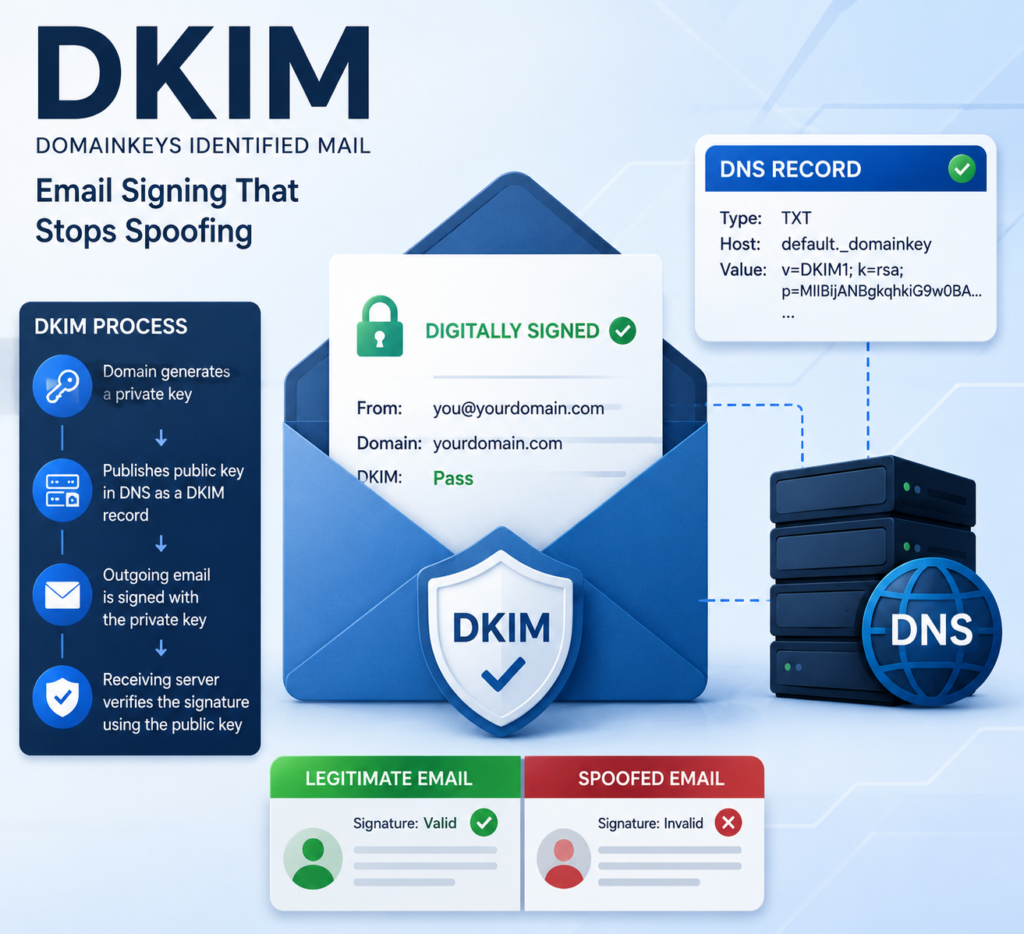
A DKIM record is a public key published in your domain’s DNS that lets receiving mail servers verify your email was genuinely sent by you and was not altered along the way. DKIM stands for DomainKeys Identified Mail, and it is the second pillar of email authentication alongside SPF and DMARC. Every message your mail system sends is stamped with an invisible digital signature; the matching DKIM record is what recipients use to check that signature.
This guide explains how DKIM signing works, why it protects your business from tampering and spoofing, and how it fits with the other standards. It is part of our overview on email authentication with SPF, DKIM, and DMARC.
How DKIM Signing Works
DKIM uses a pair of cryptographic keys. Your mail server holds a private key that nobody else can see, and it uses that key to add a signature to the header of every outgoing message. The matching public key is published as a DKIM record in your DNS. When a receiving server gets your email, it looks up that DKIM record and uses it to confirm two things: the message was signed by a server holding your private key, and the content was not changed in transit. If either check fails, the signature does not validate.
This is what makes DKIM powerful. A forger can copy your logo and wording, but without your private key they cannot produce a valid signature that matches your published DKIM record.
Why a DKIM Record Protects Your Business
Email passes through many servers between sender and recipient, and each hop is an opportunity for tampering. A signed message gives the recipient confidence that the invoice amount, wire instructions, or contract language they received is exactly what you sent. For businesses in regulated fields such as medical, legal, and financial services, that integrity guarantee matters.
DKIM also survives email forwarding, which is a key advantage over SPF. When a message is forwarded, SPF often breaks because the forwarding server is not on your authorized list, but the DKIM record signature travels with the message and still validates. That resilience is one reason DMARC can rely on either SPF or DKIM to pass.
What a DKIM Record Looks Like
A DKIM record is published as a TXT record at a special DNS location called a selector. The selector lets you run more than one key at a time, which is useful when rotating keys or using multiple mail services. A simplified example looks like this:
selector1._domainkey.yourdomain.com TXT v=DKIM1; k=rsa; p=MIGfMA0GCSq...
The important pieces are the version tag v=DKIM1, the key type k=rsa, and the public key itself, shown as p= followed by a long string. Your email provider generates the private key and gives you the matching public value to publish. Microsoft 365 and most business mail platforms create these keys for you; your job is to add the record correctly.
Common DKIM Mistakes
- Never enabling it. Many domains have SPF but never turn on DKIM signing, leaving a gap in protection.
- Publishing the key incorrectly. The public key string is long, and a copy-paste error breaks validation.
- Forgetting a mail service. Each platform that sends as you needs its own key and selector, or its mail will not be signed.
- Never rotating keys. Security best practice is to rotate DKIM keys periodically, which requires updating the record.
Because signing alone does not tell a receiving server what to do on failure, DKIM should be paired with SPF and enforced with a DMARC policy.
Let ABS Configure Your Email Authentication
Generating keys, publishing them at the right selector, and confirming every mail source is signed takes care and testing. Advanced Business Systems sets up and monitors DKIM, SPF, and DMARC for businesses in Tallahassee, Thomasville, and across North Florida and South Georgia as part of our managed IT services. Call ABS at (850) 222-2308 or contact us to lock down your email.
For technical reference, see the official DKIM specification (RFC 6376) and Microsoft’s DKIM configuration guide.
Frequently Asked Questions
What is the difference between SPF and DKIM?
SPF verifies that a sending server is authorized to send for your domain. DKIM adds a cryptographic signature that proves the message was not altered and came from a server holding your private key. They protect against different attacks and are meant to work together.
Does a DKIM record slow down my email?
No. Signing and verification happen automatically in milliseconds. Recipients never see the signature, and there is no noticeable delay in sending or receiving.
Can I use DKIM without SPF or DMARC?
You can, but you should not. DKIM proves integrity but does not set a failure policy. Combining it with SPF and DMARC provides complete authentication and the strongest protection against spoofing.
How often should DKIM keys be rotated?
Many organizations rotate keys once or twice a year as a security precaution. Your mail platform or IT provider can automate or schedule rotation so protection stays current.