
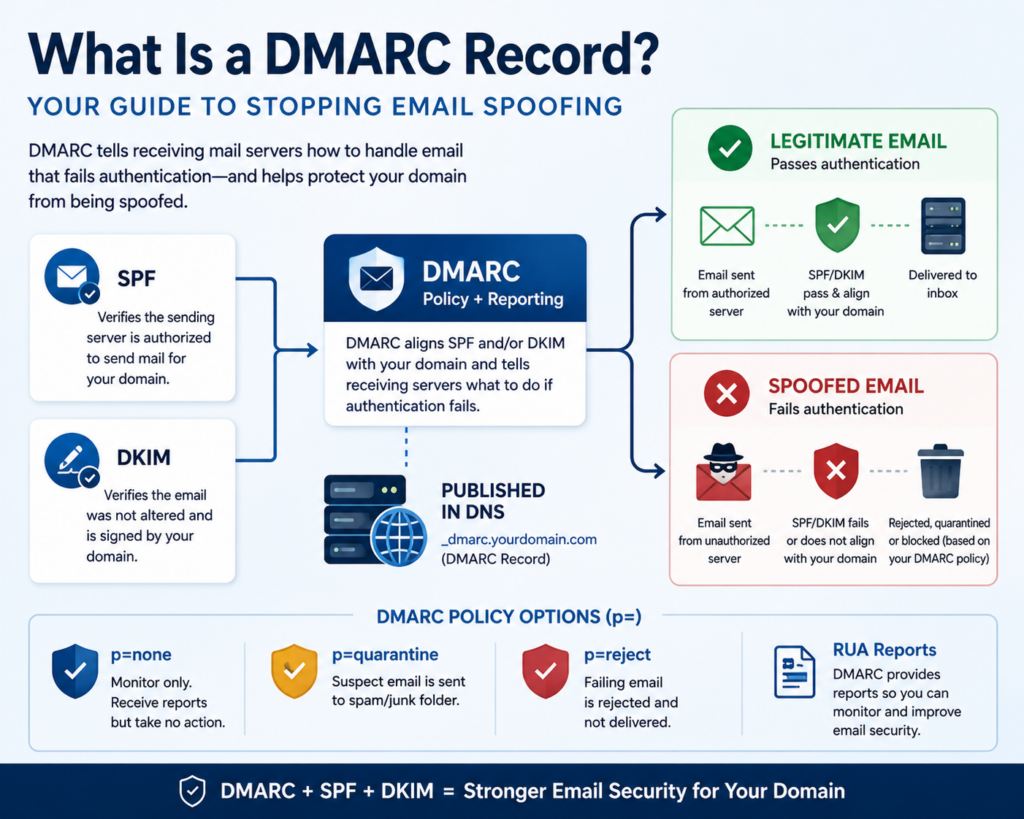
A DMARC record is a DNS entry that tells receiving mail servers what to do when an email claiming to be from your domain fails its security checks, and it sends you reports showing everyone who is trying to send mail as you. DMARC stands for Domain-based Message Authentication, Reporting and Conformance, and it is the enforcement layer that makes SPF and DKIM actually stop spoofing. Without a DMARC record, those first two standards can detect a problem but cannot dictate the outcome.
This guide explains what a DMARC record does, the three policy levels, how to read the reports, and how to roll it out safely. It is part of our overview on email authentication with SPF, DKIM, and DMARC.
What a DMARC Record Does
SPF and DKIM each perform a check, but neither tells the receiving server how to act when the check fails, and neither reports back to you. A DMARC record fills both gaps. It instructs mail servers on how to handle messages that fail authentication, and it requests that those servers send you regular reports. Those reports are often a revelation: many businesses discover, only after publishing a DMARC record, that criminals have been sending phishing emails in their name for months.
DMARC also enforces “alignment,” meaning the domain that passes SPF or DKIM must match the domain your recipients actually see in the From line. This is the detail that stops a scammer from passing a technical check with their own domain while displaying yours.
The Three DMARC Policy Levels
Your DMARC record includes a policy tag, written as p=, that sets one of three enforcement levels:
p=none— monitor only. Mail is delivered normally, but you receive reports. This is where every rollout should start.p=quarantine— send failing messages to the spam or junk folder.p=reject— refuse failing messages outright so they never reach the inbox. This is the goal state and the only level that fully stops exact-domain spoofing.
A simple DMARC record starting in monitor mode looks like this:
v=DMARC1; p=none; rua=mailto:dmarc-reports@yourdomain.com
The rua tag is the address where aggregate reports are sent. As you confirm your legitimate mail passes, you move the policy from none to quarantine to reject.
Why a DMARC Record Matters for Your Business
Exact-domain spoofing is one of the most damaging attacks a business can face, because a phishing email that truly comes from your domain is extremely convincing to customers and staff. A DMARC record at the reject level shuts that down. Beyond security, DMARC is now a deliverability requirement: since 2024, Google and Yahoo require it for bulk senders, and enforcement across major providers has continued to tighten. Publishing a DMARC record protects both your reputation and your ability to reach the inbox.
Roll Out DMARC Carefully
The one real risk with DMARC is moving to enforcement too fast. If you publish p=reject before confirming every legitimate mail source passes, you can block your own invoices, newsletters, and notifications. The safe sequence is:
- Publish at
p=noneand collect reports for a few weeks. - Review the reports to confirm every legitimate sender passes SPF or DKIM with alignment.
- Fix any sources that fail, then move to
p=quarantine. - Once clean, advance to
p=rejectfor full protection.
Because a DMARC record depends on SPF and DKIM, those two must be working correctly first.
Let ABS Manage Your Email Authentication
DMARC reports arrive as dense XML files that are difficult to read by hand, and the rollout to reject requires ongoing attention. Advanced Business Systems configures, monitors, and interprets DMARC, SPF, and DKIM for businesses in Tallahassee, Thomasville, and across North Florida and South Georgia as part of our managed IT services. Call ABS at (850) 222-2308 or contact us to protect your domain from spoofing.
For technical reference, see DMARC.org’s overview and Google’s DMARC guidance.
Frequently Asked Questions
Do I need SPF and DKIM before a DMARC record?
Yes. DMARC evaluates the results of SPF and DKIM, so both should be configured and passing before you enforce a DMARC policy. Publishing DMARC without working SPF and DKIM can block your legitimate mail.
What does p=none mean in a DMARC record?
It is monitor-only mode. Mail is delivered as usual, but you receive reports on what passes and fails. It is the safe starting point that lets you find every legitimate sender before you enforce.
Will DMARC stop look-alike domains?
No. DMARC protects your exact domain from being spoofed. It does not stop a scammer who registers a similar-looking domain. That is why it should be paired with user training and other safeguards.
How do I read DMARC reports?
Aggregate reports arrive as XML and are hard to read manually. Most businesses use a DMARC monitoring service or a managed IT provider to turn the raw data into a clear picture of who is sending mail as your domain.